Harmonic mixing
Harmonic Mixing for DJs: The Circle of Fifths Guide
How to read the circle of fifths to decide which track to mix next, and why it pays to think in notes (Am, C, Em) and stop depending on the Camelot wheel.
By Ariel Contreras · November 2026 · 8 min read

You are mid-set. The next track matches the BPM perfectly and still sounds wrong. Two melodies fighting. The crowd notices. So do you.
It comes down to something that gets checked too late: the key. Harmonic mixing uses it to decide which track can live next to which, and its tool is the circle of fifths. This guide shows how to read it in notes, when it is enough and when to trust your ears over the label. And if you want the key of every track sorted before you play, DJ Harmonic Studio analyzes your whole library in one click.
Quick answer
Harmonic mixing (also called key mixing) means blending tracks in compatible keys so melodies and basslines sit together during the transition. It relies on the circle of fifths: the same key, its two neighbors (a fifth up and a fifth down) and its relative (minor to major) are compatible. The Camelot wheel is that same circle, with numbers.
What is harmonic mixing?
Harmonic mixing, or key mixing, is the technique of mixing tracks in compatible musical keys, so melodies and basslines do not clash during the overlap. It is the difference between a transition that only lines up the beats and one that sounds like a single track.
Why your mix sounds off even when the BPM matches
BPM aligns the rhythm. Key aligns the melody and, above all, the bass. When two tracks play together their notes add up: if the basses end up a semitone apart, or a tritone or a major seventh appears between the voices, the ear hears a clash.
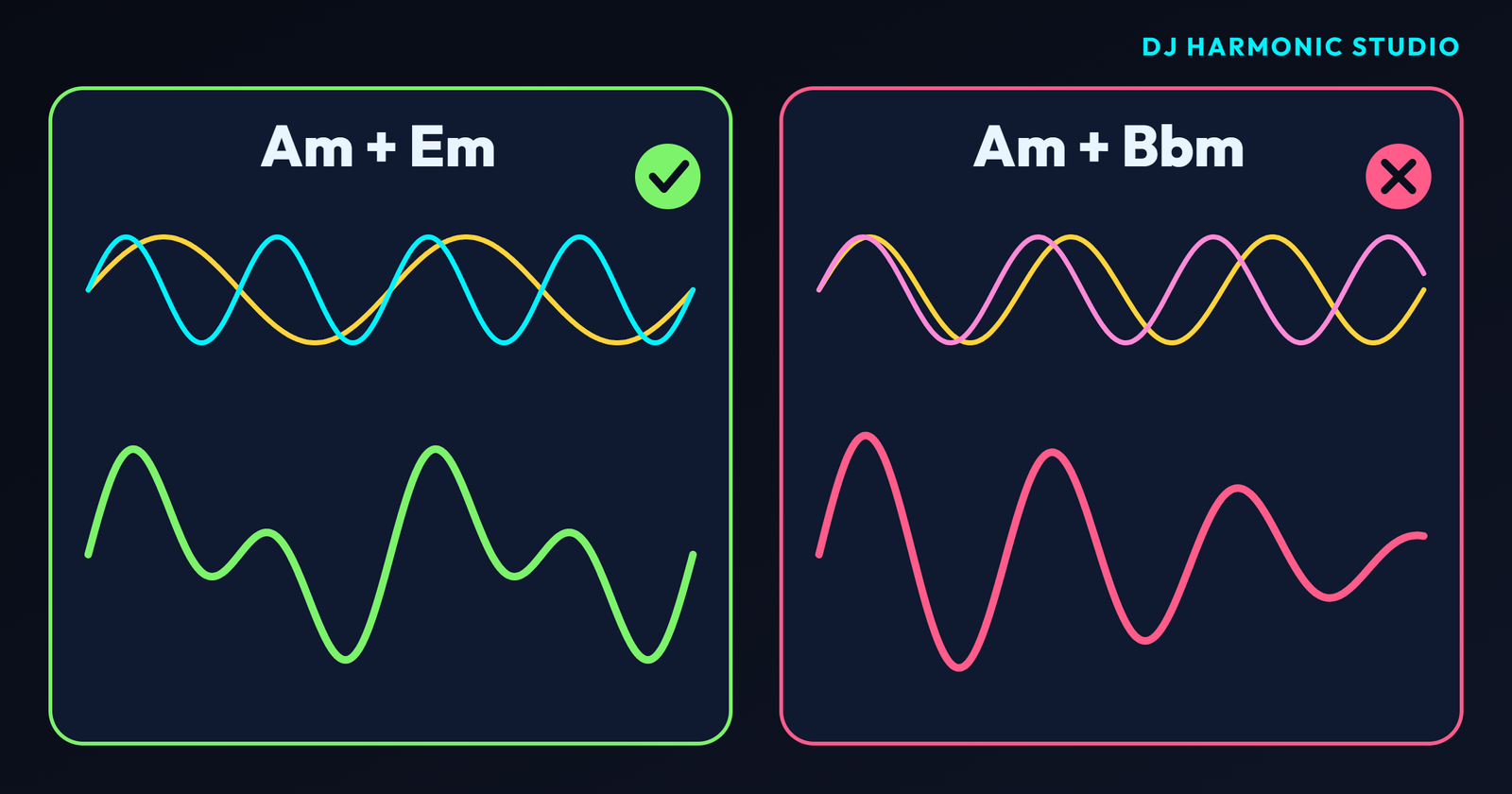
With compatible keys it is the opposite: the notes of one track fit inside the scale of the other, so you can let them overlap for longer. So, is harmonic mixing necessary? Not to play, but it is what makes long blends sound intentional.
The circle of fifths: your harmonic mixing wheel
The circle of fifths orders the 12 notes so that each step to the right goes up a fifth (C to G, G to D, D to A) and adds one sharp to the key signature. The outer ring holds the major keys and the inner ring their relative minors: Am sits under C because they share exactly the same notes.
- Neighbors: two adjacent keys share six of their seven notes. C and G differ by a single note, F becoming F#.
- Relatives: a major key and its minor share all seven notes, like C and Am.
- Distance: the farther apart on the circle, the more different notes and the higher the risk of a clash.

This guide reads keys as notes (Am, C, F#m), the way a musician writes them and the way your track titles can show them. With a bit of practice the relationship between neighbors becomes obvious. If you know the Camelot wheel from Mixed in Key or Rekordbox, it gets its own section below.
Four moves to start with
When you are not sure where to go next, these four moves are a safe starting point:

Same key
Am → Am
A minor → A minor
The transition becomes almost invisible.
A fifth up
Am → Em
A minor → E minor
Lifts the energy smoothly.
A fifth down
Am → Dm
A minor → D minor
Drops the tension without killing the flow.
Relative
Am → C
A minor → C major
Same notes, different mood: minor to major.
Energy boost
Going up two fifths (Am → Bm) gives a clear energy boost. Save it for a drop.
None of them is a guarantee: the analysis can be wrong, and two tracks in the same key can still clash if the bass and the melody do not get along. That is why your ears always get the final say.
A five-track set, step by step
Here is how it looks in a set. Five tracks, four transitions:
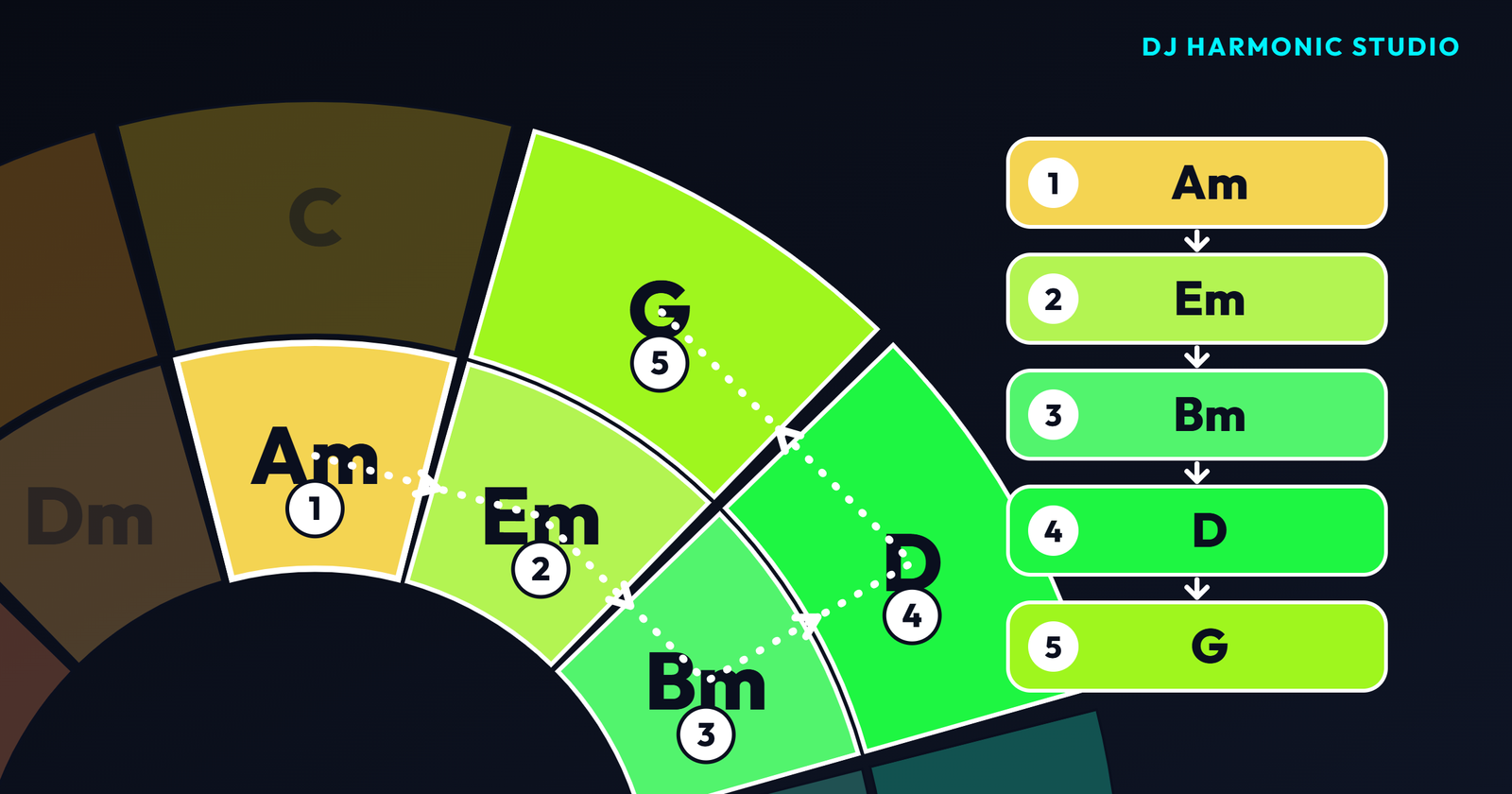
Am5th ↑→Em5th ↑→Bmrelative→D5th ↓→G
The arrow ↑ means a fifth up and ↓ a fifth down. The set climbs in energy, changes color when it moves to major and comes back down, all with one-step moves. What takes time is getting to that list with every track’s key already solved.
Where it gets hard: the key is not in front of you
With 100 new tracks, analyzing and renaming them by hand takes hours, and when you finish the key usually stays buried in the track’s info panel. On the deck you have to open it to know what you are mixing.

The result: you mix without risk, or you risk without knowing. Your ears are not the problem: the information is not where you need it. To skip the manual work, DJ Harmonic Studio analyzes the key, energy and genre of your whole library automatically.
Camelot wheel explained (and where it fits)
Programs like Mixed in Key and Rekordbox show the key as codes like 8A or 9B. That is the Camelot wheel: the same circle of fifths, with each key numbered 1 to 12 and a letter (A for minor, B for major). It is a conversion chart, nothing more.
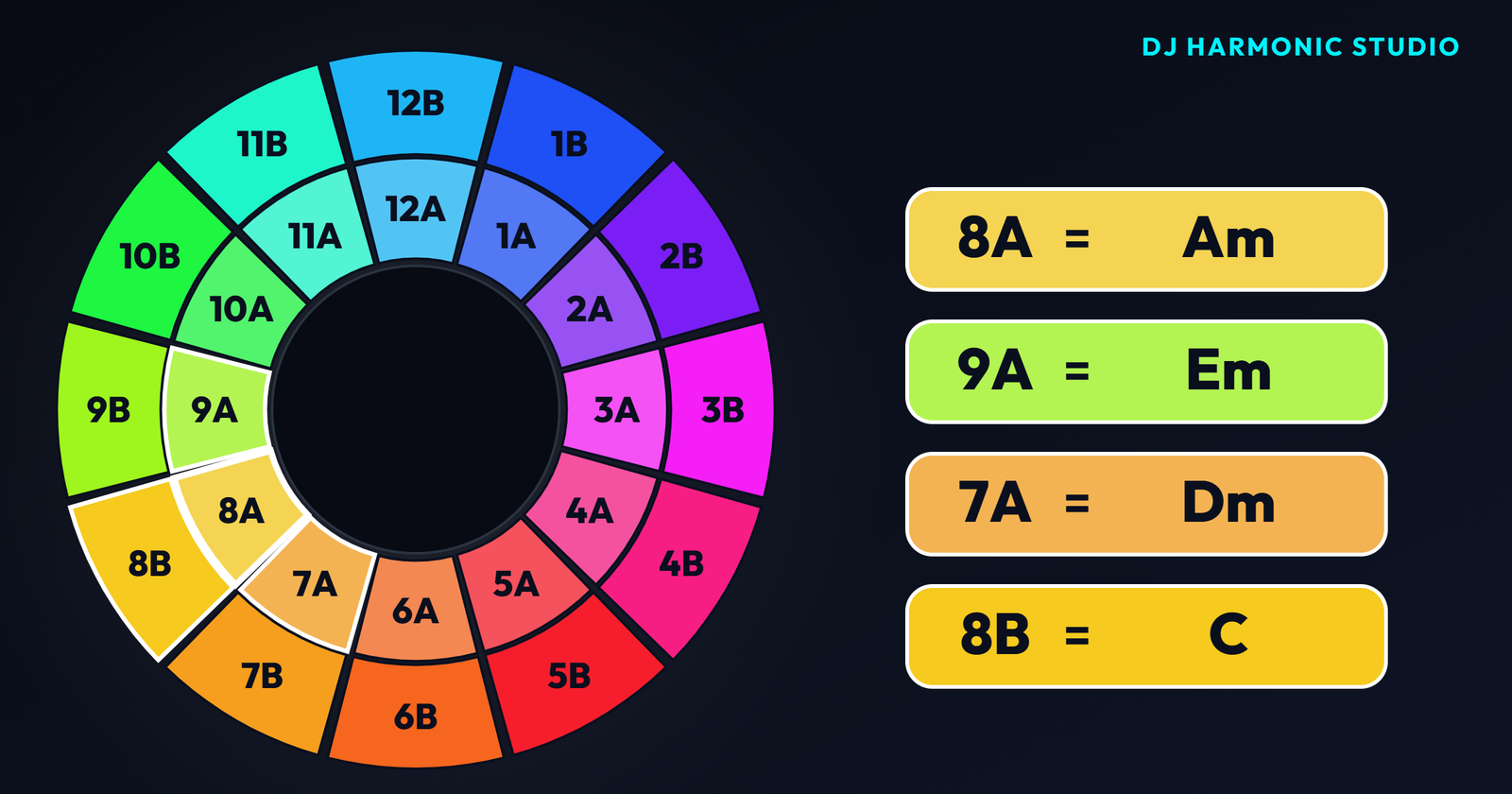
A few equivalences
Am8AEm9ADm7AC8BBm10AD10BG9B
It helps you decode what is on screen, and not much beyond that. A code does not tell you which notes a track uses, why two keys work together, or how to take that to a keyboard, a DAW or a conversation with another musician. Notes do. That is why it pays to get used to reading Am, C or F#m. Want the full comparison? Read Camelot wheel vs circle of fifths.
Key detection software compared
There are three usual ways to get the key of your music. The table compares what changes when you prepare a big library.
| Criteria | By ear, DJ software or Mixed in Key | DJ Harmonic Studio |
|---|---|---|
| Speed on a big library | By ear: hours, track by track. DJ software and Mixed in Key: fast. | Fast: one click for the whole folder |
| Key in the file name | Usually only in the track info, or depending on settings. | Automatic: [Am] Artist - Track |
| Energy and folders | Hand-built playlists. Mixed in Key shows an energy level per track. | Energy from 1 to 5 stars and folders by energy, genre or Genre > Energy |
| Fixing a doubtful analysis | Depends on the program. | Preview and edit with a single key |
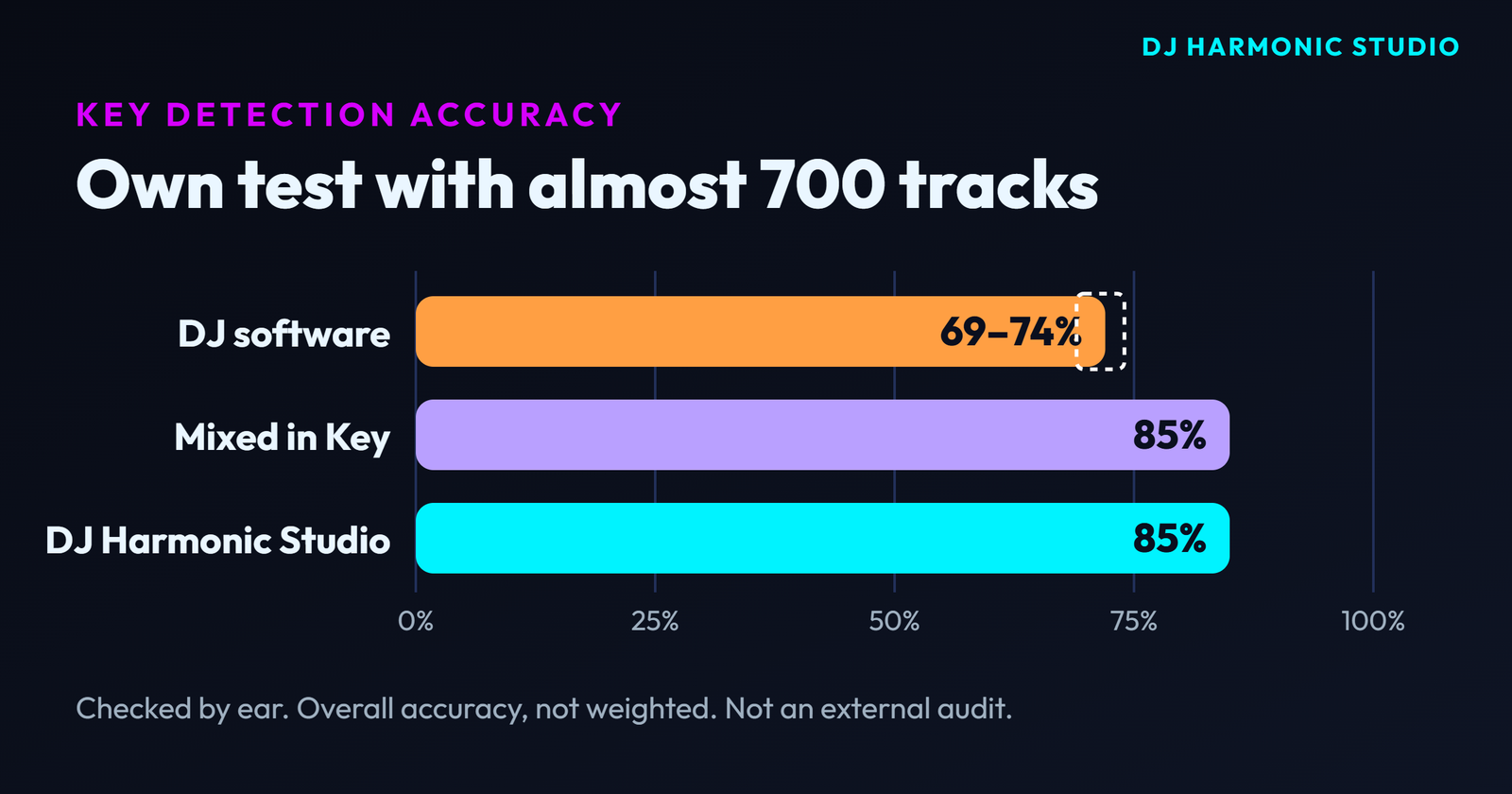
| Key detection accuracy* | By ear: depends on your training. DJ software: between 69% and 74%. Mixed in Key: 85%. | 85% |
* Ariel’s own test with almost 700 tracks checked by ear (overall accuracy, not weighted). It is not an external audit.
In that test, DJ Harmonic Studio reached 85% accuracy, the same as Mixed in Key. What it adds is what comes next: it renames the tracks, builds the folders and exports to Rekordbox, Serato, Traktor, VirtualDJ and Engine DJ. It does not replace any of them, it complements them. It also does not build your set order; it shows key and energy so you decide on the spot.
Our take
If you are looking for a Mixed in Key alternative that, besides analysis, writes the key in the title and sorts your library into folders by energy and genre, DJ Harmonic Studio is the most logical choice. Two practical reasons:
- Stars from 1 to 5. Energy uses the same scale as other DJ software, so your tracks read the same everywhere.
- Faster workflow. Edit energy and key with a single key press and renaming is automatic. That is how any DJ, beginner, intermediate or pro, saves hours of prep per session compared with other analysis software.
How to organize a library for harmonic mixing
- Analyze. With one click, DJ Harmonic Studio reads your whole library and gives you key, energy and genre. If something does not match your ear, you fix it.
- Export. Sort by energy (1 to 5 scale), by genre or both, depending on your plan. Each track is renamed with its key, in standard notation (Am, C, F#m) or, if you prefer, Camelot.
- Import into your software. Rekordbox, Serato, Traktor, VirtualDJ or Engine DJ: the key shows on the deck without opening any panel.
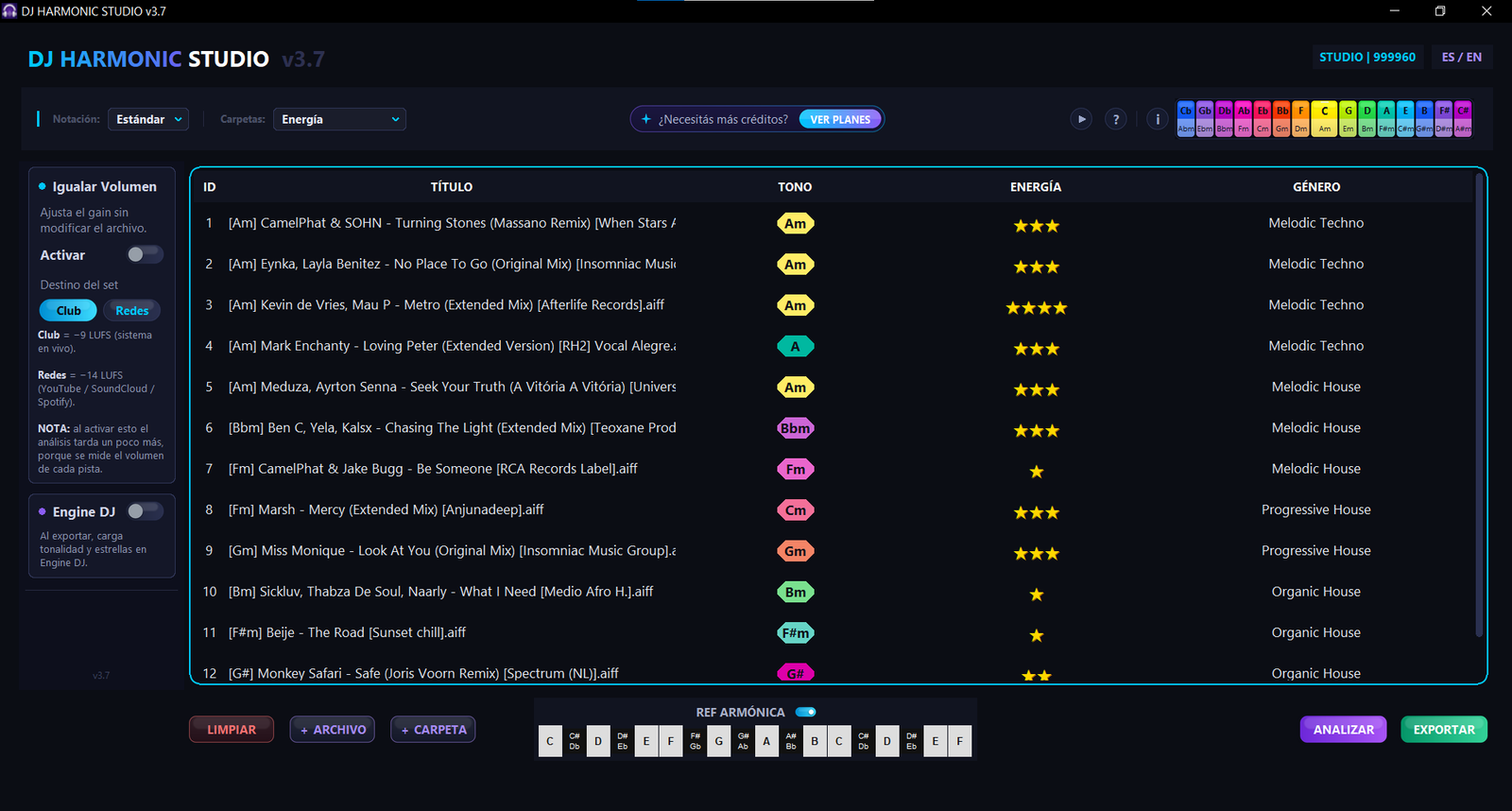

A few details that help day to day: you can edit key and energy from the keyboard, there is a digital piano to compare basslines by ear, and you can normalize volume to −9 LUFS for club or −14 LUFS for social media.
An honest note
If you use Rekordbox and your tracks already have hot cues, export with the “create copy” option. That keeps the original untouched and you use the renamed copy.
Common harmonic mixing mistakes
- Mixing by BPM only. Tempo says nothing about melody or bass.
- Treating the key as a guarantee. Analysis can fail; check by ear before you trust it.
- Ignoring energy. Two compatible tracks can have very different energy.
- Following a code without understanding the note. It tells you what to do, not why it works. Learning the circle in notes gives you your own judgment.
I am a musician, and from my first tracks I made sure every one was properly analyzed. When I noticed that analysis software kept getting keys wrong, I started working them out by ear and writing the key by hand at the start of every track name.
That habit gave me a competitive edge: I knew exactly what I was mixing. But it cost me hours. To stop losing time, in January 2026 I started building DJ Harmonic Studio and launched it in late March, once I saw the results it gave me. Today more than 1,400 DJs have used it.
Frequently asked questions
Harmonic mixing, also called key mixing, is the technique of mixing tracks in compatible keys so melodies and basslines do not clash during the transition. It relies on the circle of fifths.
Not to play, but it makes long blends sound intentional and helps you avoid clashes. It matters most in melodic electronic music, where overlapping basslines and melodies are exposed.
You can work it out by ear with a piano or keyboard, or use key detection software. DJ Harmonic Studio analyzes the key, energy and genre of your whole library in one click, and you can preview and correct any result by ear.
8A is A minor (Am). The number is the position on the wheel and the letter A means minor. Its closest neighbors are 7A (Dm), 9A (Em) and 8B (C).
None in the map: the Camelot wheel is the circle of fifths with each key numbered 1 to 12 and a letter. The circle names keys as notes (Am, C), which shows which notes two tracks share. More in Camelot wheel vs circle of fifths.
Yes. DJ Harmonic Studio analyzes key, energy and genre, renames your tracks and sorts them into folders. In Ariel’s own test with almost 700 tracks checked by ear it reached 85% accuracy, the same as Mixed in Key. It has 50 free tracks to try.
It depends on your workflow. If you want one click to analyze a whole library, write the key in the track title, sort folders by energy and genre and export to Rekordbox, Serato, Traktor, VirtualDJ or Engine DJ, DJ Harmonic Studio is built for that. It runs on Windows, Mac and Linux and is optimized mainly for electronic music.
Yes. DJ Harmonic Studio is compatible with Rekordbox, Serato, Traktor Pro, VirtualDJ and Engine DJ. It does not replace those programs: it prepares your library before it reaches them.
Try it with your library
Analyze your first 50 tracks for free
Get the key written in the title and your music in folders by energy and genre, ready for Rekordbox, Serato, Traktor, VirtualDJ or Engine DJ.
Instant download · No credit card · Windows, Mac and Linux · Optimized for electronic music
About me
Ariel Contreras
I studied a Bachelor’s in Music with a focus on Composition and a Technical Degree in Arrangement, and I have played piano and synthesizer since 2007. I have always been a composer, in other musical styles; in 2018 I ventured into electronic music, blending it with other genres, and since 2022 I have focused fully on electronic music production: my latest EP reached #27 in Melodic House on Beatport. I have been a DJ since early 2024. Between 2025 and 2026 I helped more than 235 people understand harmony for their mixes and productions.
I created DJ Harmonic Studio, which more than 1,400 DJs have used. Try it free with your library: it is available for Windows, Mac and Linux and optimized mainly for electronic music.
DJ Harmonic Studio · © 2026 All rights reserved